
TechTip Wednesday: Using SQL Services to Gather Security Information
IBM i SQL services provide powerful ways for administrators to access system information that isn’t always available through traditional CL commands. In this post, we’ll explore how these services can simplify security reporting, auditing, and system analysis with practical SQL examples.
IBM has been leveraging SQL services to gain access to various system functions for several versions now. Often, these services give you access to system administration functions that do not exist in CL commands. For instance, there are many CL commands to view information, but those often only offer a print option to save data for comparison or review later. But there is often an IBM I service offering that will let you run an SQL statement and get that same data into a file or exportable format.
These SQL services are being added to, or enhanced, all the time with the DB2 PTF groups and the Technology Refresh (TR) updates.
https://www.ibm.com/support/pages/ibm-i-services-sql
This series will give a tech note on utilizing some of these IBM I services as a systems administrator.
Why SQL Services Matter for Auditing and Security
Today’s topic is about some security information that you can gather using SQL
One of the tasks that I have performed through the years was to work with auditors to gather security information. Often, they will have you gather information about your security levels, system values, and functional usage (to name a few items). We will run through some examples of how you can script some of this output to run on demand for the auditors to gather that information when they ask.
Gathering System Security Information with QSYS2.SEC_INFO
Usually, an auditor will want to know some overall system security information. IBM has provided a service that will spit out that information with an SQL statement. Many of the individual items that you would sort through in system values are put in one place: QSYS2.SEC_INFO. Read more about this specific value here to get details on everything that is included.
Using your ‘Run SQL Scripts’ window within IBM ACS, you can run the statement below:
SELECT *
FROM qsys2.sec_info;
This will give you a single row output that includes items such as your system security level, your password level, and the existence of the system audit journal.

There is much more that is included in the screenshot, I encourage you to read the IBM document at the above link. (Hint, that documentation might need to be included with the output you give the auditor.)
Using SQL to Retrieve Specific System Values
Now, let’s say that the auditor wants to see the values of a specific list of system values. I can frequently recall being given a list of system values that they wanted to have recorded. This next example will give you a way to document those values. The service for this data is QSYS2.SYSTEM_VALUE_INFO.
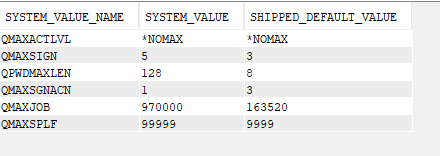
We will start with the IBM example, where we are looking for any system value that contains the variable ‘MAX’ to indicate maximum value settings:
SELECT SYSTEM_VALUE_NAME,
SYSTEM_VALUE,
SHIPPED_DEFAULT_VALUE
FROM QSYS2.SYSTEM_VALUE_INFO
WHERE SYSTEM_VALUE_NAME LIKE '%MAX%';
In the output, we get a side-by-side comparison of the current and shipped values for any system value that contains the word ‘MAX’:
Reviewing Password‑Related System Values
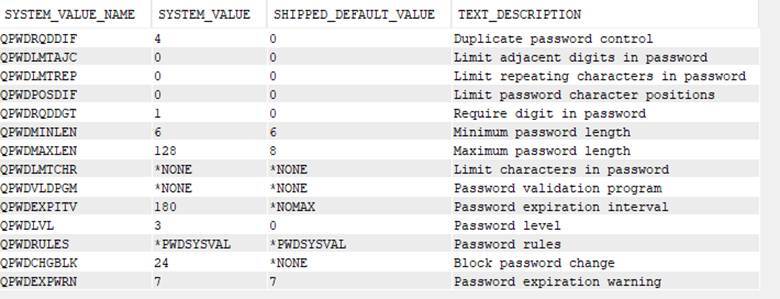
Now, if we switch that up a little, we can search for the variable ‘PWD’ to get our password values (and we will add the text description of the system value for more clarity):
SELECT SYSTEM_VALUE_NAME,
SYSTEM_VALUE,
SHIPPED_DEFAULT_VALUE,
TEXT_DESCRIPTION
FROM QSYS2.SYSTEM_VALUE_INFO
WHERE SYSTEM_VALUE_NAME LIKE '%PWD%';
Understanding and Auditing Function Usage Controls
Another security tool, which has been around since V4R5, is to control access to system functions through Function Usage. This method allows you to grant, or deny, operational access to specific functions within the operating system.
An example of this is the DDM and DRDA access (QIBM_DB_DDMDRDA) function usage. You can allow all users to access DDM and DRDA connectivity (which is the default), or you can set a specific list of users that are permitted to use this system functionality. Another example would be the ability to restrict (or allow) access to specific functions within IBM Navigator for i. (Read more about those here.)
Due to this, auditors will often want to know more about your Function Usage controls that you might have in place.
Here is a statement that you can use to see what Function Usage definitions are on the operating system, along with the default usage for any user:
SELECT FUNCTION_ID,
FUNCTION_NAME,
FUNCTION_DESCRIPTION_MESSAGE_TEXT,
DEFAULT_USAGE,
USAGE_INFORMATION_INDICATOR
FROM QSYS2.FUNCTION_INFO
ORDER BY FUNCTION_ID;
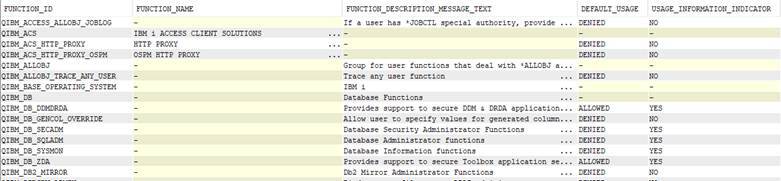
If you look at the far-right column (USAGE_INFORMATION_INDICATOR), you will see that there are some that have a ‘YES’ – indicating that there are specific users names within those functions.
Listing Users Assigned to Function Usage Definitions
Try this statement (and some variations) to see the listed users:
SELECT *
FROM QSYS2.FUNCTION_USAGE
ORDER BY FUNCTION_ID,
USER_NAME;
Using SQL Services to Analyze User Profile Information
Now, let’s look at gathering some user profile information using the SQL services. IBM has included a couple of views for many years to gather (and subset) information about user profiles. These are:
- QSYS2.USER_INFO_BASIC – a subset of the USER_INFO view that performs a bit better than USER_INFO
- QSYS2.USER_INFO – contains all user profile information
I have linked the information pages to the names above so you can compare what is not included in the USER_INFO_BASIC view. For this example, I am going to user the basic view, but they both work for much of the info. I want to gather some information about the users on the system, such as the last time they signed on and whether they are enabled or disabled:
SELECT AUTHORIZATION_NAME,
PREVIOUS_SIGNON,
MAXIMUM_SIGN_ON_ATTEMPTS,
STATUS,
PASSWORD_CHANGE_DATE,
LIMIT_CAPABILITIES,
STORAGE_USED
FROM QSYS2.USER_INFO_BASIC;

You can run that statement with some qualifiers as well, such as looking for a status of *DISABLED, or to look for a specific user class like *SECOFR. You can even filter to look for users that were given a special authority outside their user class, such *ALLOBJ perhaps.
Alright, now that we have satisfied the auditors, let’s review a couple of examples to help secure your system (or look for objects that might not have the right security).
Checking Object Ownership Before Deleting User Profiles
First, let’s look at an example to determine object ownership for a specific user. This is accomplished using the QSYS2.OBJECT_OWNERSHIP service view. This might be handy if you are getting ready to delete a user profile from the system, but you first need to understand what that user owns on the system:
SELECT *
FROM QSYS2.OBJECT_OWNERSHIP
WHERE AUTHORIZATION_NAME = 'USER_PROFILE'; (sub the user profile here)
This will output a list of all objects that user owns, including in the IFS (note the highlighted PATH_NAME column below):

Reviewing Object Authorities Within a Library
Suppose you have a library that should contain application files that should be set to *PUBLIC exclude, or perhaps a specific authorization list. Here is an SQL statement you can utilize to check the permissions in a specific library:
SELECT *
FROM QSYS2.OBJECT_PRIVILEGES
WHERE SYSTEM_OBJECT_SCHEMA = 'LIBRARY_NAME'
and AUTHORIZATION_NAME = '*PUBLIC' ;
(sub the library name for LIBRARY_NAME)
In this example, I was looking for what *PUBLIC has set for object authority in the library.
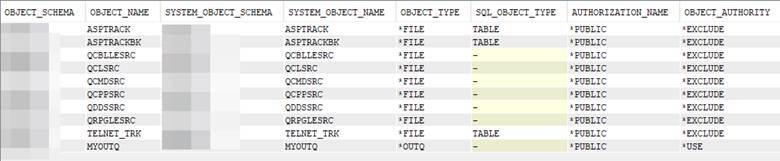
This might be a handy review to make sure the authorities of a library line up with what you expect!
Strengthening System Security with Additional SQL Services
This is just an introduction, there are several more security related services that are available. Give them a try and see how you can make these simple examples work for your needs!
Automating System Value Collection for Audit Readiness
Extra Credit:
Side ‘quest’ idea – you can take the system values for the entire system and record them to a file on a scheduled basis. Look at some of the older articles for ideas on how to complete that task.